On September 8, Meta introduced Muse, a personal AI agent that "doesn't just answer questions, it actually does the work." What sets Muse apart from a chatbot is where it does that work. In Meta's words: "Muse has its own computer, with a file system and a terminal, so it can write its own code." It also has a full web browser, keeps working in the background, and checks back with you when something needs a decision.
A computer with a terminal is exactly where the 5am CLI lives. We built it for AI agents from the start: one binary, JSON output, exit codes that mean something, and a skill file that teaches an agent how to use it. Put the two together and Muse gets a media studio. It can bring your Instagram posts into 5AM albums, share an album with family or with a public link, turn an album into a reel, cut a long video into short clips, give a whole shoot one look, make motion films and put together a whole launch campaign, all from a sentence you type on your phone.
This post shows how to set it up in about five minutes, with prompts you can paste straight into Muse.
Why the pairing works
- Muse can use command-line tools. Meta's post on Muse's safety design says Muse "can also write its own custom connectors for other services if they have their own APIs or CLIs." The 5am CLI is that CLI: one download for Linux, nothing else to install for library work. The video and photo tools also use ffmpeg, Node.js and Chromium, which Muse can install itself.
- Muse learns from skills. Meta writes "SKILLs" (detailed instructions to Muse) for its own connectors. We publish one for the CLI at cli.5am.app/cli/latest/SKILL.md. It covers every command, what each one prints, and the mistakes to avoid.
- Muse knows your Instagram. 5AM keeps your media. Instagram is a Meta app, so Muse can already reach your posts. 5AM is where your photos and videos live in full quality: organized in albums, searchable by what's in them, and shared only with the people you choose.
- No AI key needed. Every AI feature in the CLI runs on your 5AM AI credits. If you'd rather use your own Gemini key,
5am keys set geminiworks too.
Set it up
1. Make a token for Muse
On the web, open Settings → Keys and find CLI Access Tokens. In the 5AM app for iPhone or Android, it's under the Profile tab, in Account Settings → CLI Access Tokens. Generate a token, name it "Muse", tick read and write, leave admin off, and set it to expire in 30 or 90 days. Copy the token; it's only shown once.
A token without admin can't delete your albums or your media. It can upload, organize, share and create, which covers everything in this post.
2. Ask Muse to install the CLI
Paste this into Muse:
Install the 5am CLI in your home folder with
curl -fsSL https://cli.5am.app/cli/latest/install.sh | FIVEAM_INSTALL_DIR="$HOME/.local/bin" sh, then read https://cli.5am.app/cli/latest/SKILL.md so you know how to use it. Ask me for my 5AM token when you're ready to log in.
Installing into the home folder keeps the CLI next to the rest of Muse's files, and it doesn't need administrator rights.
3. Give Muse your token
Muse asks for the token when it gets to the login step. Paste it in, and Muse logs in and checks your account:
5am login --token <your token>
5am whoami
5am account --pretty
From here on, you can just ask.
Approvals you may see
Everything Muse sends to the internet passes through Sentinel, a separate guard on Muse's computer that the agent can't switch off. As Meta puts it, "Nothing Muse does reaches the internet unless the Sentinel approves it." Sentinel decides by itself when to ask you first; in our own runs, uploads to 5AM went through without a question. If Muse does ask before reaching one of these addresses, they're ours:
| Address | What it's for |
|---|---|
cli.5am.app | The installer, updates and the skill file |
5am.app | Your library: albums, media and account |
ai.5am.app | AI features paid for with your AI credits |
assets.5am.app | Fonts for motion films |
Things to ask Muse
Bring your Instagram into 5AM
Download all my Instagram photos and videos, then upload them to 5AM with one album per year, named "Instagram 2024", "Instagram 2023" and so on. Keep each post's caption and date on the matching item.
Muse handles the Instagram side by itself. Then the CLI takes over, one year at a time:
5am media upload ./instagram/2024 -r \
  --include '*.jpg,*.jpeg,*.png,*.webp,*.mp4' \
  --new-album "Instagram 2024" --concurrency 8 > uploaded-2024.json
The CLI reports every file separately, with the new item's mediaId. Muse uses that to match each file to its post and copy the caption and date across:
5am media update <mediaId> --description "Sunday market haul" --date-taken 2024-06-02T10:14:00Z
The second step matters more than it looks. Photos saved from Instagram usually lose their camera data, so the post date is the best record you have of when each one was taken. With it, your albums sort in the order things actually happened.
A few things that help with a big archive:
- Muse can see exactly which files failed and retry just those, because each file gets its own result.
- Interrupted uploads resume. Large videos upload in parts, and if the connection drops, running the same command again picks up where it stopped.
- Add
--describeto the upload and 5AM writes a short description of every photo and video as it arrives (this uses a little of your AI credits). Then you can find things by meaning, from Muse or from 5AM itself:
5am media semantic-search "sunset at the beach" --limit 20
Share an album, with people or with a link
Share my "Lisbon 2026" album with mum@example.com and dad@example.com. Then make a public link for it that I can post.
5am albums share <albumId> --share mum@example.com --share dad@example.com
5am albums public-link enable <albumId>
Each person gets an email. Anyone new to 5AM gets an invite that's valid for 7 days. The second command gives back the link to post (publicUrl), the same one the share dialog on the web gives you. People without a 5AM account sign up for free to open it.
When you want a share gone, ask Muse to undo it:
5am albums shares <albumId>                          # who has access, and the public link
5am albums unshare <albumId> --user dad@example.com
5am albums public-link disable <albumId>
To let someone add their own photos too, share with --share friend@example.com:0:read_and_write.
Turn an album into a reel
Make a vertical reel from my "Lisbon 2026" album with warm acoustic music. Keep faces in frame and save it to an album called Reels.
5am media collage --album "Lisbon 2026" --aspect 9:16 --smart-crop \
  --music "warm acoustic guitar, sunny afternoon" \
  --output lisbon-reel.mp4 --new-upload-album "Reels"
Each photo gets a slow pan and zoom, and they cross-fade into each other over music written for the reel. --smart-crop finds the main subject of each photo, so the vertical crop doesn't cut anyone out.
Cut a long video into short clips
Take the newest episode in my "Podcast" album and cut it into five vertical clips with bold captions. Put them in an album called Shorts.
5am media list --album <albumId> --type video
5am media download <mediaId> --output episode-42.mp4
5am media clips episode-42.mp4 --count 5 --aspect 9:16 --style bold \
  --new-upload-album "Shorts"
The CLI transcribes the episode once, has AI pick the five strongest moments that make sense on their own, and renders each one with burned-in captions and a title. Every clip also comes with an editable .vedl file, our plain-text edit format, so Muse can tighten a cut and render it again without starting over.
Give a whole shoot one look
Give every photo in my "Wedding" album the same warm, soft look, crop them 4:5 for Instagram, and put the results in a new album. Show me one edited photo before you do the rest.
5am update --runtime-only        # once: installs the photo-editing runtime
5am albums download <albumId> --type image --output ./wedding
5am media image-edit generate \
  --brief "Warm portrait look, soft contrast, lifted shadows. Local adjustments only; no generative edits." \
  -o warm.iedl
5am media image-edit batch warm.iedl --input-dir ./wedding --output-dir ./wedding-warm --report batch.json
5am media smartcrop --folder ./wedding-warm --size 1080x1350 --output-dir ./wedding-4x5
5am media upload ./wedding-4x5 -r --new-album "Wedding, 4:5"
The look is written once as a recipe (the .iedl file) and applied the same way to every photo, so the whole set matches. Your originals in 5AM are never changed; the edited copies go into the new album.
Make or change an image
Using my photo of the tram in Lisbon, make a cover for the album: the same street at golden hour, with clear sky across the top for a title.
5am media generate image --image ./lisbon/tram.jpg \
  --prompt "The same street and tram at golden hour, warm light, clear sky across the top third" \
  --aspect-ratio 4:5 --output lisbon-cover.png
5am media upload lisbon-cover.png --album "Lisbon 2026"
Make a motion film
Make a 15-second vertical film announcing my Saturday pottery classes, using three photos from my "Studio" album. Show me a preview before you render it.
5am update --runtime-only        # once, if Muse hasn't already
5am motion generate \
  --brief "A 15 second vertical film announcing Saturday wheel-throwing classes for complete beginners. Saturdays at 10am, small groups of 8, clay, glazes and firing included. Call to action: Book a seat, link in bio." \
  --photo media:<id> --photo media:<id> --photo media:<id> \
  --format 9:16 --duration 15 -o pottery.motion.json
5am motion sheet pottery.motion.json -o pottery.png         # free preview
5am motion revise pottery.motion.json "Remove the 2.5 hour workshop line; it isn't in the brief" -o pottery-v2.motion.json
5am motion render pottery-v2.motion.json -o pottery.mp4 --fps 30 --new-album "Films"   # 20 AI credits
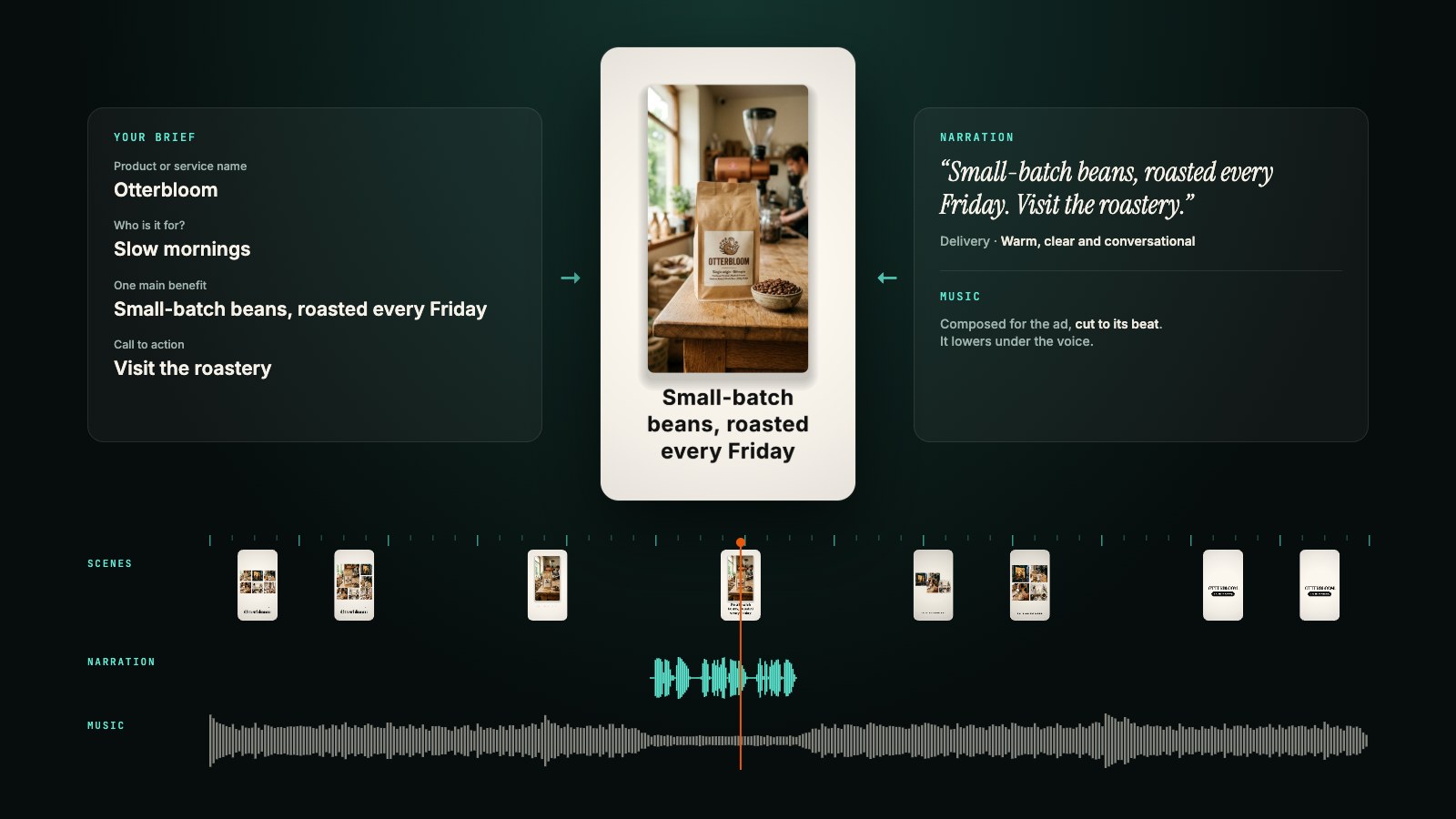
Motion films are kinetic type, shapes and your photos, cut to a beat with music composed for the film. They come from the same engine as Motion Studio on the web. Previews are free, so Muse can show you the contact sheet, take your notes and render only when you're happy. A render costs 20 AI credits, and the film carries a small "Made with 5AM" mark.
Read the preview for facts as well as looks. The first draft of the film below added a "2.5 hour workshop" that wasn't in the brief, and one revise took it out.
Made with the commands above. The three photos are AI-generated samples, also made with the CLI (5am media generate image).
Put together a launch campaign
We launch our Autumn Blend coffee on Monday. Using the photos in my "Autumn Blend" album, make a launch kit: five captions, three post images, a short vertical video ad with a voiceover and music, and five clips from last week's tasting live stream. Stay under 2,500 AI credits, put everything in an album called "Autumn launch" and show me before you share anything.
This is where the pieces add up. Muse plans the campaign and writes a brief for each piece, and the CLI makes them:
# Captions
5am media generate text --output captions.txt \
  --prompt "Write five Instagram captions for Autumn Blend, a coffee with notes of toffee and baked apple, out Monday. Under 150 characters each, one per line."

# Post images, built from your own product photo
5am media generate image --image ./autumn/bag.jpg \
  --prompt "This coffee bag on a wooden table with fallen maple leaves, soft morning light" \
  --aspect-ratio 4:5 --output post-1.png

# Voiceover and music, mixed so every word sits on top of the music
5am media generate audio --voice Puck --output voice.wav \
  --text "Autumn Blend is here. Toffee, baked apple and a long, warm finish. Made for slow mornings. Out Monday."
5am media generate music --prompt "warm acoustic folk, light percussion, cosy" --output bed.mp3
5am media mix --voice voice.wav --music bed.mp3 --style promo --output voiceover.m4a

# The ad: two video shots, joined, with the voiceover laid on top
5am media generate video --model veo-3.1-fast-generate-preview --aspect-ratio 9:16 \
  --image ./autumn/bag.jpg --prompt "Slow push in on the coffee bag as leaves drift past" --output shot-1.mp4
5am media generate video --model veo-3.1-fast-generate-preview --aspect-ratio 9:16 \
  --prompt "Coffee pouring into a ceramic cup, steam rising in autumn light" --output shot-2.mp4
5am media concat shot-1.mp4 shot-2.mp4 --reencode --audio voiceover.m4a --output ad.mp4

# Clips from the live stream
5am media clips tasting-live.mp4 --count 5 --aspect 9:16 --style bold \
  --brief "the moments where we describe the flavour"

# Everything in one album
5am media upload post-*.png ad.mp4 tasting-live-clips/*.mp4 --new-album "Autumn launch"
The mix keeps the music under the voice the way a radio mixer would, and the ad runs as long as the voiceover. Because every piece is a file on Muse's computer, nothing is final until you say so: ask for a warmer image, a different voice or a slower read, and Muse remakes just that piece.
Give Muse a budget, as in the prompt above. As a rough guide, an image costs 40 to 70 AI credits, a music clip 40 to 80, a minute of voice about 30, and a fast video shot about 800. Video is by far the biggest cost: the two shots in this kit are about 1,600 credits on their own, so a type-led motion film (20 credits to render) is the cheaper ad when you don't need filmed footage. Muse can check your balance with 5am keys list before it starts.
Here is that cheaper option for the same launch: a 12-second motion film from one product photo.
Made with 5am motion generate --format 9:16 --duration 12 --photo bag.jpg and a short brief, one revise to keep it to the brief's facts, then render. The product photo is an AI-generated sample.
Let it run while you get on with your day
Muse works in the background and tells you when something is done. That suits the slow jobs: a few thousand Instagram posts, an hour-long video, a wedding with eight hundred photos. Ask once, put your phone away, and Muse lets you know when the album is ready.
What stays in your control
On Muse's side, Meta built guards that apply to everything above:
- Sentinel, not Muse, decides what reaches the internet and when to ask you first.
- You can open and edit the files on Muse's computer, including what Muse remembers about you.
On 5AM's side:
- The token lives on Muse's computer. Apps Meta connects for you use credentials Muse never sees. Your 5AM token is different: Muse holds it. So give it only what it needs: read and write, no admin, with an expiry.
- No admin means no deleting. The token can't delete albums or media.
- You can cancel it any time under CLI Access Tokens, on the web in Settings → Keys or in the app's Account Settings. It stops working within 15 minutes.
- Costs are easy to check. AI work uses your AI credits and uploads count toward your storage. Ask Muse to run
5am account --prettyand5am keys listto see both.
Get started
- Generate a token named "Muse" with read and write, in Settings → Keys or in the 5AM app for iPhone or Android under Profile → Account Settings.
- Open Muse, paste the install prompt above and give it the token when it asks.
- Ask for something: "Bring my Instagram into 5AM" is a good first job.
Everything the CLI can do is on the CLI page, and the story of how we built it is in Introducing the 5am CLI. If you try this with Muse, tell us what you made and what got in the way.
Muse is a product of Meta. 5AM is independent and isn't affiliated with or endorsed by Meta. Quotes about Muse come from Meta's announcement, the Muse introduction and Meta's post on security and safety for AI agents.