You roast coffee, groom dogs, teach pottery or fix bikes. You have good photos, a clear offer and no time to learn a video editor. The ad you need is short and simple: what you sell, why it matters to the person watching, and what to do next. It should still read on a phone with the sound off.
Ad Maker makes that ad. Fill in four fields, add a few photos from your 5AM library and your brand kit, start from one of 13 designs or let AI write it, then change anything you like. The result is a 30-second vertical MP4 for Instagram Reels, YouTube Shorts and TikTok, with square and landscape versions one click away.
What Ad Maker is
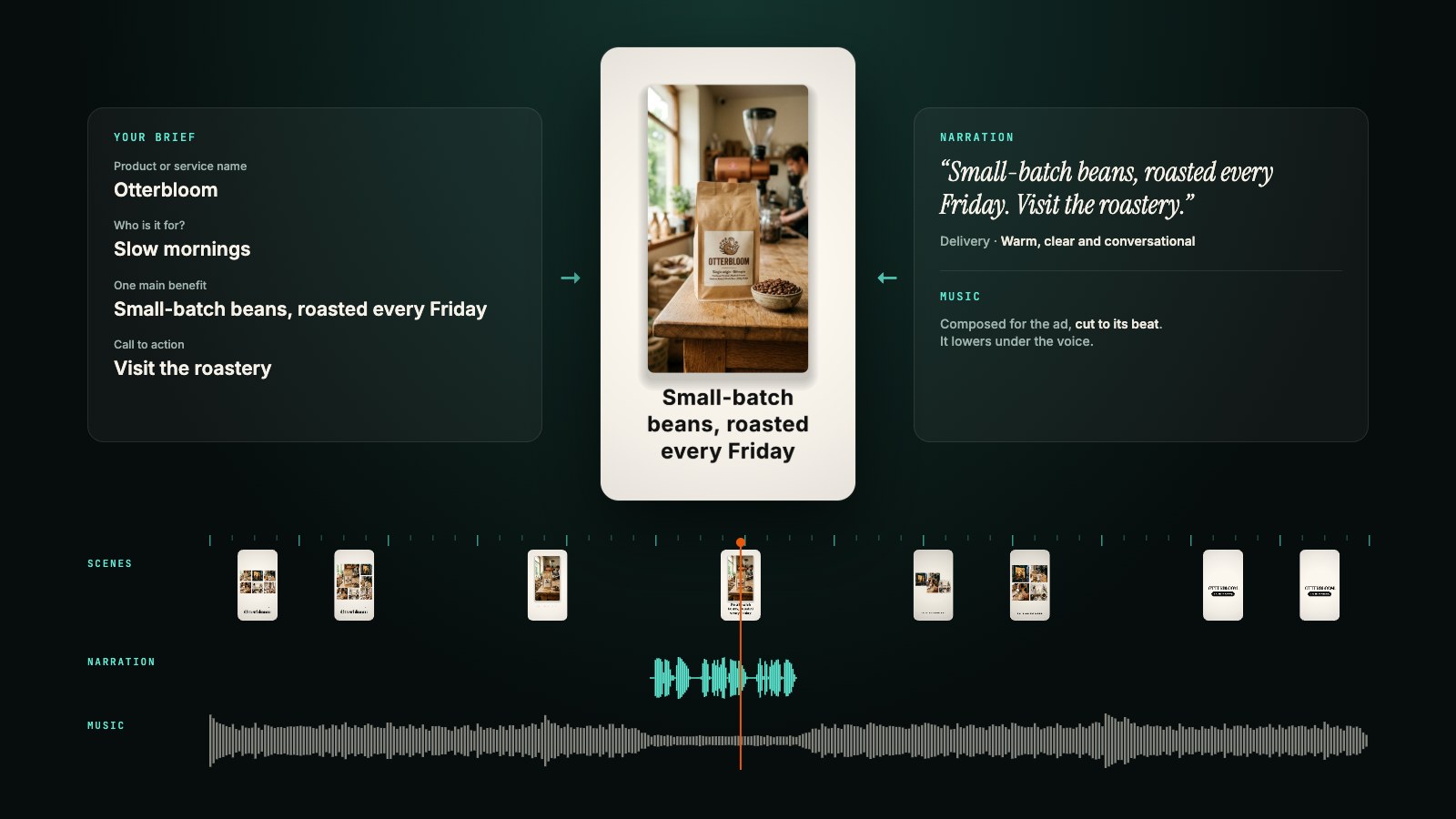
Each ad starts from your facts: the name of your product or service, who it is for, its one main benefit and your call to action. Ad Maker turns them into a motion-designed video: big kinetic type, your photos laid out as a grid or a hero shot, transitions cut to the beat, and a soundtrack composed to match.
Two promises shape everything it does:
- It speaks your words. The claims in your ad come only from your brief. Ad Maker writes the wording and arranges the scenes, but it does not add facts you did not give it. Leave the proof field empty and you get no invented testimonial; leave the offer empty and you get no made-up discount.
- Nothing is locked. Every word, scene, color and layout can be changed after the first draft, and every version you make is kept.
Ad Maker is available on every plan, Free included. Previews are free; you pay only when you export.
How to make an ad
1. Describe what you sell. Open Ad Maker and choose Start a new ad. In the Brief tab, answer:
- What are you promoting? A product or a service.
- Product or service name
- Who is it for?
- One main benefit: the single thing that matters most to that person.
- Call to action: what they should do, such as "Book a visit" or "Shop the kettle".
Open Offer, proof and contact details to add an offer and its terms, supporting facts or proof, and a website, handle or contact. All three are optional, and contact details appear as text in the video. Use facts you can stand behind.
Under Suggested 30-second story you can see the shape a good short ad usually follows: a hook in the first three seconds, the benefit by about eight, the product or service shown working until about eighteen, the offer (or the benefit again) until twenty-four, and the call to action at the end. It is a guide, not a rule; the timing adapts to your ad's length and its music.
2. Add your photos and your brand. Under Your photos, pick up to 12 from your library, or upload new ones from the picker. Put the one that shows your product best first. No photos is fine too: Ad Maker then makes a clean typographic ad.
Choose a Brand kit (your default kit is already selected) and where your logo goes: on the Closing card, in a Corner of every frame, Both, or No logo. More on brand kits below.
3. Start from a design, or let AI write it. On a new ad, the preview shows the template gallery, each design drawn live with your details, your photos and your brand kit. Press play on any of them to watch it full size with its music.
- Five signature designs: Signature reveal, Gallery unfold, Editorial, Kinetic poster and Spotlight orbit, built around the most striking moves Ad Maker can draw.
- Eight classics: Bold statement, Product showcase, Photo story, Offer spotlight, Made for you, Tap to act, Proof first and Quiet luxury.
Pick one and choose Create with that design. The draft is built right away from your brief, with no AI credits. If you then want the words written for this specific ad, Adapt with AI rewrites them from your brief while keeping the design, the timing and your photos.
Prefer something original? Choose AI writes it, add a line of creative direction if you like ("Warm and reassuring. Lead with the product photo."), and Ad Maker composes a new ad from your brief.
4. Make it yours. Everything in the draft can change:
- Ask for a change. Type it under Describe a change, or a new idea, such as "Shorter headline" or "Make the ending feel calmer", and press Revise. New take writes a fresh version from the same brief. Your versions sit under the preview; tap one to go back to it.
- Move things on the canvas. Pause on a scene and choose Edit layout / add images. Drag any element, nudge it with the arrow keys, make it smaller or larger, or remove it. Drop a logo or a product image (PNG, JPEG or WebP) onto the preview to place it in that scene.
- Edit the words and the look. The Scenes tab lists every scene with its text. Style changes the palette, the fonts and how the motion feels, from punchy to calm.
- Change the shape. Switch between Reels / Shorts · 9:16, YouTube · 16:9 and Square · 1:1, and set the length from 6 to 60 seconds. The open version reflows to fit.
5. Add a voice (optional). In the Sound tab, the Narration panel starts with a script written from your campaign. Edit it, choose a Voice and a Delivery (for example "Warm, clear and conversational") and press Generate narration. The music lowers under the voice in the preview and in the export. A narration that runs longer than the video is never sped up or cut: shorten the script or lengthen the ad.
6. Export. Press Export video. Choose 1080p, or 1440p when your browser can encode it, and 30 or 60 frames per second. Ad Maker renders the video on your own computer, in the browser, and the dialog shows its progress. When it is done, Download MP4 or Upload to album. The exported video carries no 5AM watermark.
Brand kits
A brand kit holds your brand once, so every ad starts on brand. Open Brand kits to make one: start with your logo (Ad Maker suggests colors from it), then set your background, text and accent colors, a headline font and a body font, and optionally a tagline, a call to action, your website and a narration voice.
When you start a new ad, your default kit is applied, and any blank name, call to action or website in the brief takes the kit's. The kit's palette, fonts and logo are applied to each version in code, so a draft never drifts off brand, and your logo is always shown whole: never cropped, recolored or graded.
Editing a kit later does not change the ads you already made. When an ad no longer matches its kit, the Brief tab offers Apply brand kit. Brand kits are shared with Clip Maker, so your clips and your ads can wear the same look.
Research the market first (Premium)
Not sure which angle to lead with? Open Research the market with an AI Character in the Brief tab, choose one of your AI Characters as the researcher (or describe one and Ad Maker creates it on the spot), and press Research this market. It searches the web for your category and returns a dated report on what your audience needs, the alternatives they compare you with, where you could stand apart and hooks worth trying, with the sources it used. A report without sources is labelled unverified.
Research never writes your ad for you. You read the report, then put the angle you want into Creative angle to use; only that line reaches the ad, and your claims still come only from your brief. Market research is part of the Premium plan.
Pricing and what is saved
- Previews are free. So are templates: building a draft with Create with uses no AI credits.
- Writing with AI, revisions, research and narration use your Gemini access: your plan's AI credits, or your own Gemini key if you have added one.
- Each export costs 500 AI credits and carries no 5AM watermark. Exports are charged in credits on every account, including accounts with their own Gemini key. You are charged once, after the video has rendered; if rendering fails or you cancel, nothing is charged, and if the payment step fails you can retry it without rendering again.
On the Free plan, the one-time 500 AI credits cover one export of an ad built from a template. See pricing for each plan's allowance, or add credits in Billing.
Your ads are saved to your account with their versions, up to 12 per ad and 50 ads per account. Your photos, logo and narration live in your library, and deleting an ad leaves them there. The exported MP4 stays in your browser until you download it or upload it to an album. Your ads and photos are private to your account.
Practical details
- Formats: 9:16 (1080x1920), 16:9 (1920x1080) and 1:1 (1080x1080), or 1440p on the short side where your browser supports it.
- Length: 6 to 60 seconds. New ads start at 30.
- Photos: up to 12 per ad, from your library.
- Images you drop on the preview: PNG, JPEG or WebP, up to 20 MB.
- Phones: Ad Maker works in a phone browser; on a small screen the editing tools sit above the preview.
- What it does not do: Ad Maker makes the video file. Posting it and running the campaign happen in Instagram, YouTube or TikTok. It does not check each platform's on-screen buttons for you yet, so watch your ad once at phone size before you post it.
Get started
Write down the one benefit you would tell a customer at the counter, pick three to six photos that show it, and see what Ad Maker drafts. Start your first ad, or set up your brand kit first so every ad starts on brand.