If you ship media for a living, your day probably looks something like this: raw footage on one drive, renders on another, references in Drive, mood boards in Notion, a paid model in one browser tab, an editor in another, a host somewhere else, and an invoice you keep meaning to send. The work is creative. The plumbing isn't.
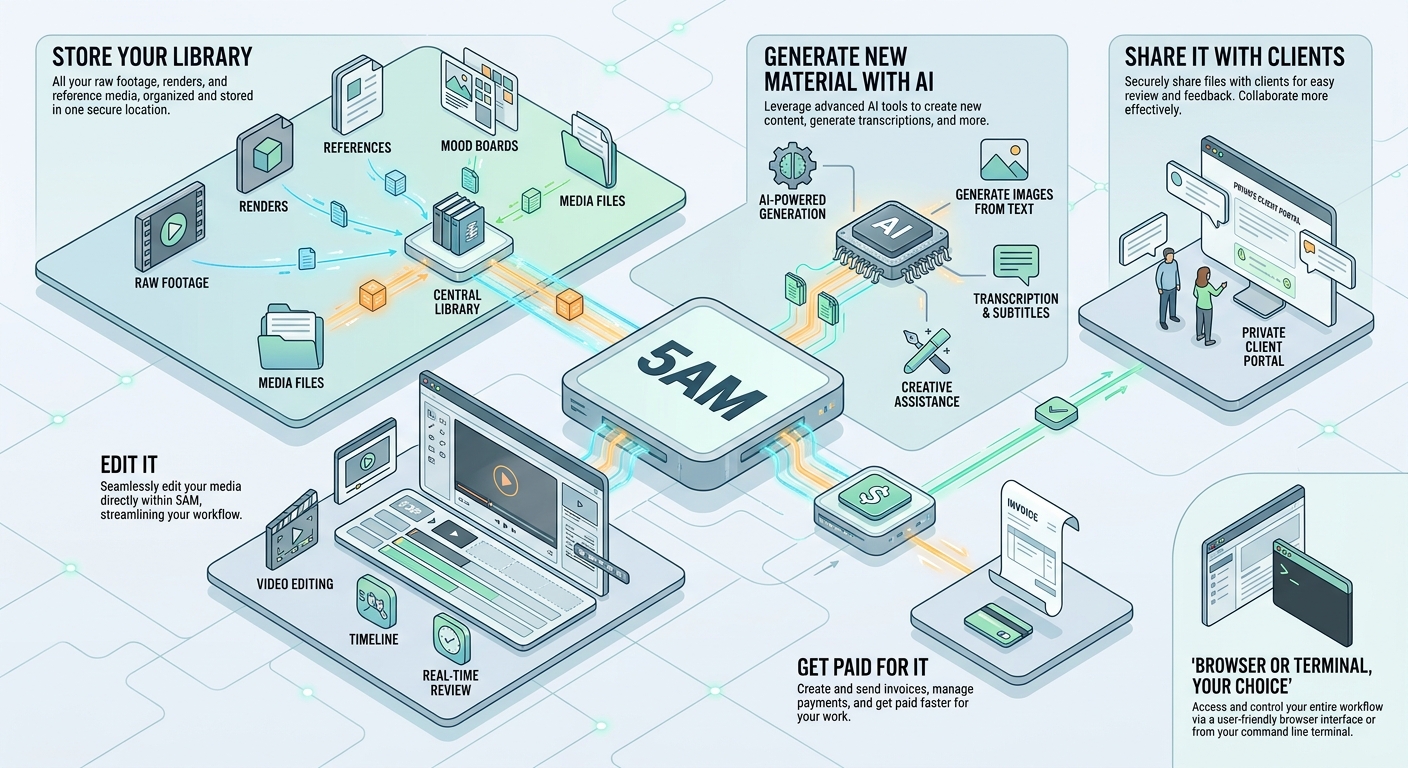
5AM is the plumbing — collapsed into one place. Store your library, edit it, generate new material with AI, share it with clients, and get paid for it. Browser or terminal, your choice. Here's the actual tour.
One library for photos, video, and audio
Upload supported files from the web or CLI into albums. Media processing creates previews and available metadata; supported formats and limits depend on the upload route. Direct video uploads use signed storage URLs, while routes such as Camera to Cloud have their own limits. Check storage quota and transfer completion before discarding local copies.
Semantic search can find indexed items by a description such as “dog on a beach at sunset.” Indexing is a separate AI operation, can take time, and uses AI credits or provider billing. A thumbnail appearing in an album does not establish that the item is indexed.
Editing that doesn't fight you
The image viewer is built for the gesture you actually use: pinch to zoom, drag to pan, double-tap to jump in. Crop has the aspect ratios you ship to (1:1, 16:9, 9:16, 4:3, 3:4, or free). Tone curves run on the GPU. Filters, text overlay, the usual basics — fast.
AI editing can help remove or change objects, while manual adjustments let you control crops and color. Review generated changes for unwanted detail changes and check the selected tool’s access and credit requirements before using it.
Video gets a timeline editor with the processing pipeline pushed into Web Workers so the UI doesn't stutter. Trim, cut, join, mute, replace audio. Check codec support and the exported file; a container extension alone does not guarantee playback.
AI Studio: models and billing
Generate images or video with the models available in the current Studio selector. That selector is the maintained source for model availability; access and providers can change.
Supported requests can use included AI credits. If you save a provider key, supported BYOK requests use provider billing instead. Check pricing, your selected model, and the displayed cost before generating. Generated output can be saved into the library for editing and sharing; review it before using it in client work.
The CLI
If you've automated anything, you'll like this part. The 5am CLI is a single Go binary, cross-platform, JSON by default. It's built to be piped — into jq, into shell loops, into AI agents like Claude Code or Gemini CLI.
# Upload a shoot and print its owner album URL (sharing is separate)
set -euo pipefail
ALBUM=$(5am albums create --name "Shoot $(date +%F)" | jq -r .id)
5am media upload ./renders -r --include '*.jpg,*.mp4,*.mov' \
  --album "$ALBUM" --concurrency 8
echo "https://5am.app/album/$ALBUM"
This Bash example needs jq, an authenticated CLI with create/upload permissions, and a local ./renders directory. Check the uploaded results, then configure sharing for recipients. Uploads parallelize with a configurable worker pool, big videos use presigned URLs under the hood, progress streams to stderr so your JSON pipes stay clean.
There's a longer write-up if you want it: Introducing the 5am CLI.
Share it. Sell it. Keep the money.
Three ways to share an album:
- Direct — invite collaborators by email with Viewer or Editor access. Good for clients and teams.
- Public link — share a URL, optionally protected by a token. Good for portfolios and one-off handoffs.
- Paid access — set a price, share the link, get paid when someone buys access. Good for selling presets, stock packs, cuts, or whole collections.
Paid access uses Stripe and Stripe Connect for payments and payouts. Review the current fees, eligibility, and payout settings in the selling flow before quoting a net amount to a client.
Pricing
The Free tier includes 5 GB of storage and a one-time AI credit allowance. Start with library upload and basic editing, then check the pricing page for the plan required by each AI or automation feature. AI usage is separate from the free CLI download and local rendering.
If you need more space or want to unlock features like AI characters, check out all the details on our pricing page.
Where to start
If you want to poke around, sign in and create your first album in about thirty seconds. If you'd rather start from the terminal, the CLI page has install one-liners for macOS, Linux, and Windows.
If you build something interesting, we'd like to see it.